How To Use Audio Notetaker with on-line presentations
1. Open up your internet browser and navigate to the presentation you want to work with.
2. Open Audio Notetaker and create a new project.
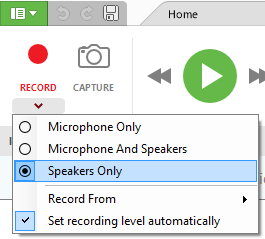
3. Use the drop down arrow next to the record button and select ‘speakers only’
4. Click on the camera button to bring up the screen capture frame (see How to Use Screen Capture for a video demonstration).

5. Click Record
6. Select your browser again and drag/ resize the screen capture frame over the video.

7. Go to your video and start playback
8. As you watch the video click on the camera icon at the top of the frame to capture a still image of the video and create a new section in Audio Notetaker.
9. When the video has finished you can close the screen capture window and stop recording in Audio Notetaker.
2. Open Audio Notetaker and create a new project.
3. Use the drop down arrow next to the record button and select ‘speakers only’
4. Click on the camera button to bring up the screen capture frame (see How to Use Screen Capture for a video demonstration).
5. Click Record
6. Select your browser again and drag/ resize the screen capture frame over the video.
7. Go to your video and start playback
8. As you watch the video click on the camera icon at the top of the frame to capture a still image of the video and create a new section in Audio Notetaker.
9. When the video has finished you can close the screen capture window and stop recording in Audio Notetaker.